
Theme Builder
Design the parts of your site
the theme used to decide.
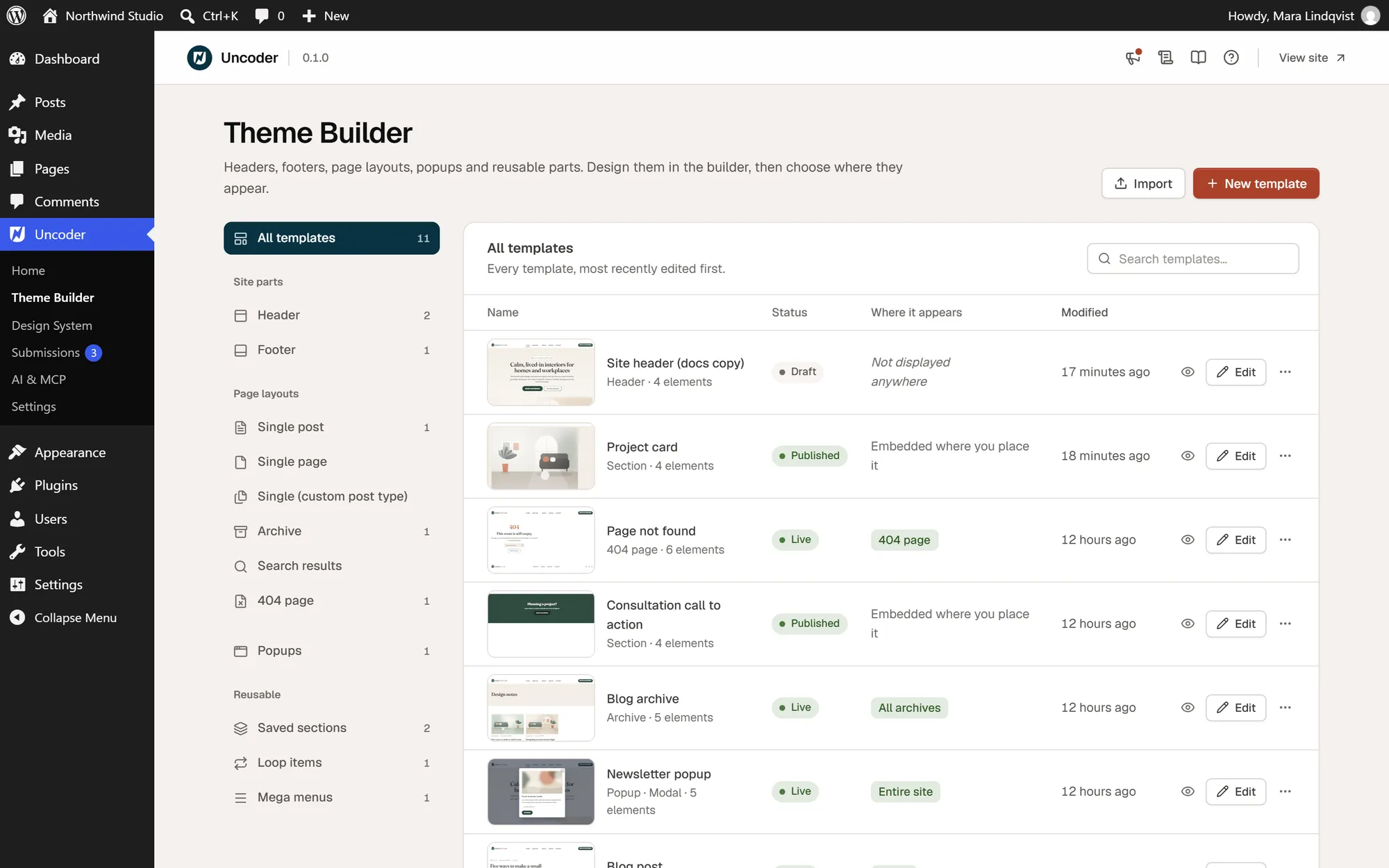
Headers, footers, post layouts, archives, search results, the 404 page, popups, mega menus and loop items — built visually, and shown exactly where you choose.
01 Template types
Twelve kinds of template,
one editor.
Every template is built with the same containers, widgets and Design System as your pages. Dynamic widgets fill in the title, content, author or archive of whatever is being shown.
Header
Logo, menu and calls to action. Sticky, reveal-on-scroll, shrinking or transparent.
Footer
Link columns, contact details, legal links and anything else you need at the bottom.
Single post
The layout for blog posts: title, meta, featured image, content, author and navigation.
Single page
A shared layout for pages that are not built with Urmi themselves.
Single (custom post type)
Layouts for products, events, courses or any other public post type.
Archive
Blog index, category, tag, author, date and custom post type archives.
Search results
What visitors see after searching, with your own empty-results message.
404 page
A friendly page for broken links, with search and a way back home.
Popup
Modals, slide-ins, bars and full-screen overlays with triggers and targeting.
Mega menu
A designed dropdown panel for a top-level menu item.
Loop item
A card built with dynamic tags, repeated by loop grids and carousels.
Section
A reusable block: edit it once and every page that embeds it updates.
02 Display conditions
Say where
each template belongs.
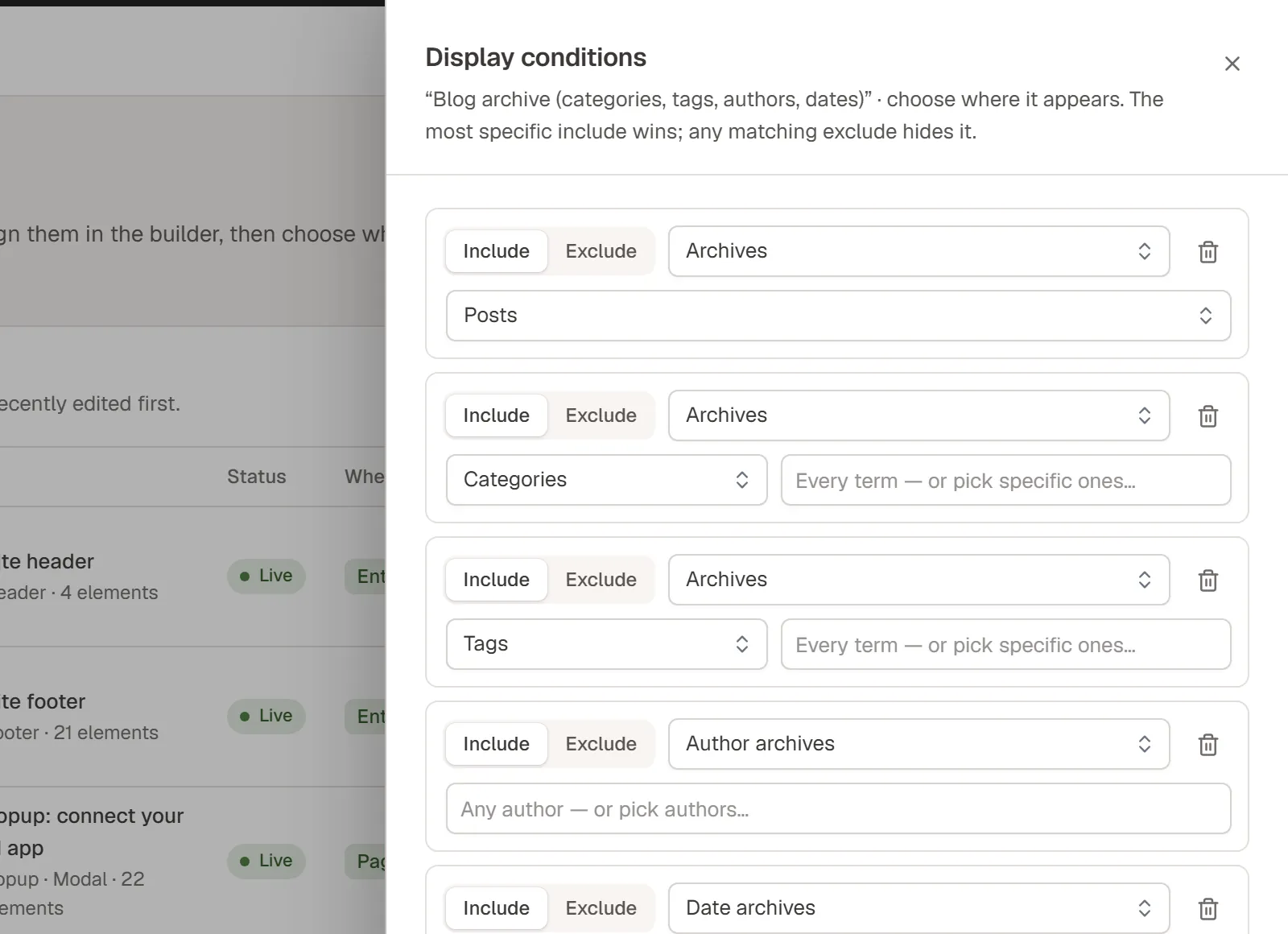
Each template carries a list of include and exclude rules. When several templates could apply, the most specific include wins — and an exclude always does.
03 Headers & menus
Headers that behave
the way you want.
Header behaviour is a setting on the template, not a pile of custom CSS.
Sticky or reveal
Keep the header visible, or hide it while scrolling down and bring it back on the way up.
Shrink and restyle
Change the background, add a shadow and reduce the height once the page scrolls.
Transparent over heroes
Let the header float over the first section on all pages, the front page or pages you choose, with an alternate logo.
Mobile menus
Collapse the Nav Menu into a dropdown, an off-canvas panel or a full-screen menu on tablets and phones.
Mega menus
Replace a menu item’s dropdown with a mega menu template: columns of links, icons, images or a call to action.
Multilingual
With WPML or Polylang, headers and footers follow the visitor’s language.
04 Live preview
See templates in context
before they go live.
The Theme Builder shows a live thumbnail of every template. Preview renders a template on a real page of your site — drafts included — so you can check it before publishing.
In the editor, single and loop item templates use “Preview with” to show a post of your choosing, so dynamic widgets display real content while you design.
05 Loops, popups & sections
The pieces between
pages and templates.
Design one card, repeat it everywhere
Build a post card with dynamic tags once. Loop Grid and Loop Carousel repeat it for every item of a query, with pagination, load more or infinite scroll.
Triggers, frequency and targeting
Open popups on load, scroll, exit intent, click, inactivity or after a number of page views, and limit them by device, visitor, referrer or schedule.
Reuse without copy and paste
Save a section and embed it on any page. Turn it into a component with properties, and each placement can change its own text, images and links.
Theme Builder templates work with classic and block themes: Urmi headers and footers replace the theme’s own, and pages can use a full-width layout inside your theme or a blank canvas.