
AI & MCP
Build your site
together with your AI.
Urmi has a Model Context Protocol server built in. Connect Claude, ChatGPT, Cursor or another MCP client and it can read your site, follow your Design System and build pages you keep editing by hand.
01 How it works
From a sentence
to a page you can edit.
MCP — the Model Context Protocol — is an open standard that lets AI apps use tools. Urmi gives them tools for your site, plus the instructions to use them well.
01
Install Urmi
Add the plugin to your WordPress site. The MCP server is part of it — there is nothing else to host.
02
Connect your app
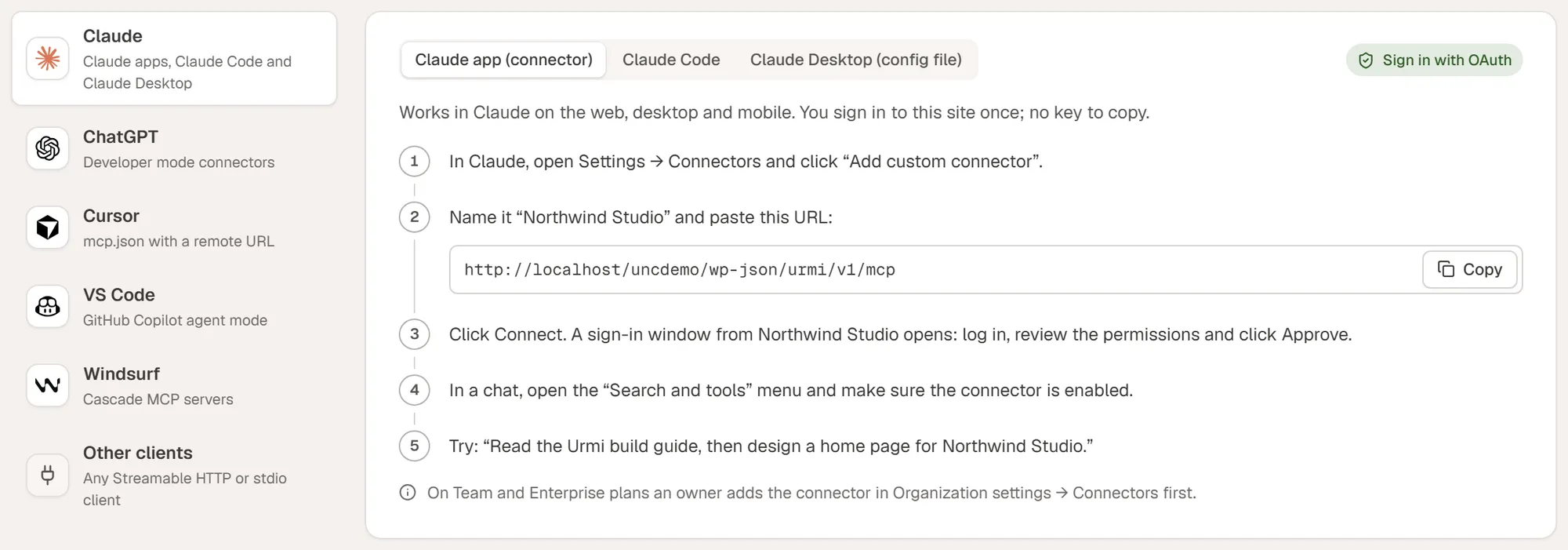
Open Urmi → AI & MCP and follow the guide for your app: one-click OAuth for Claude and ChatGPT, an API key for the rest.
03
Ask for what you want
Describe a page, a template, a menu or a change. The AI reads the build guide and widget schemas, then builds.
04
Review in the editor
With the page open, the AI’s changes appear live with an Undo button. Everything it made is ordinary, editable elements.
It reads before it builds
A build guide and exact widget schemas tell the AI which settings exist and what values they take, so it produces valid elements that follow your Design System.
It checks its own work
The page audit reports heading order, missing alt text, contrast, placeholder copy, responsive risks and SEO gaps — with element ids, so the AI can fix them.
It starts from patterns
The same 40 section patterns you see in the editor are available to the AI, so it can compose pages from tested layouts instead of inventing each one.
02 Supported apps
Works with the AI apps
you already use.
The AI & MCP screen shows copy-ready setup steps for each of these. Your site’s server URL is filled in for you.
Urmi → AI & MCP: server status, calls and changes in the last 24 hours, and a guide for every app.
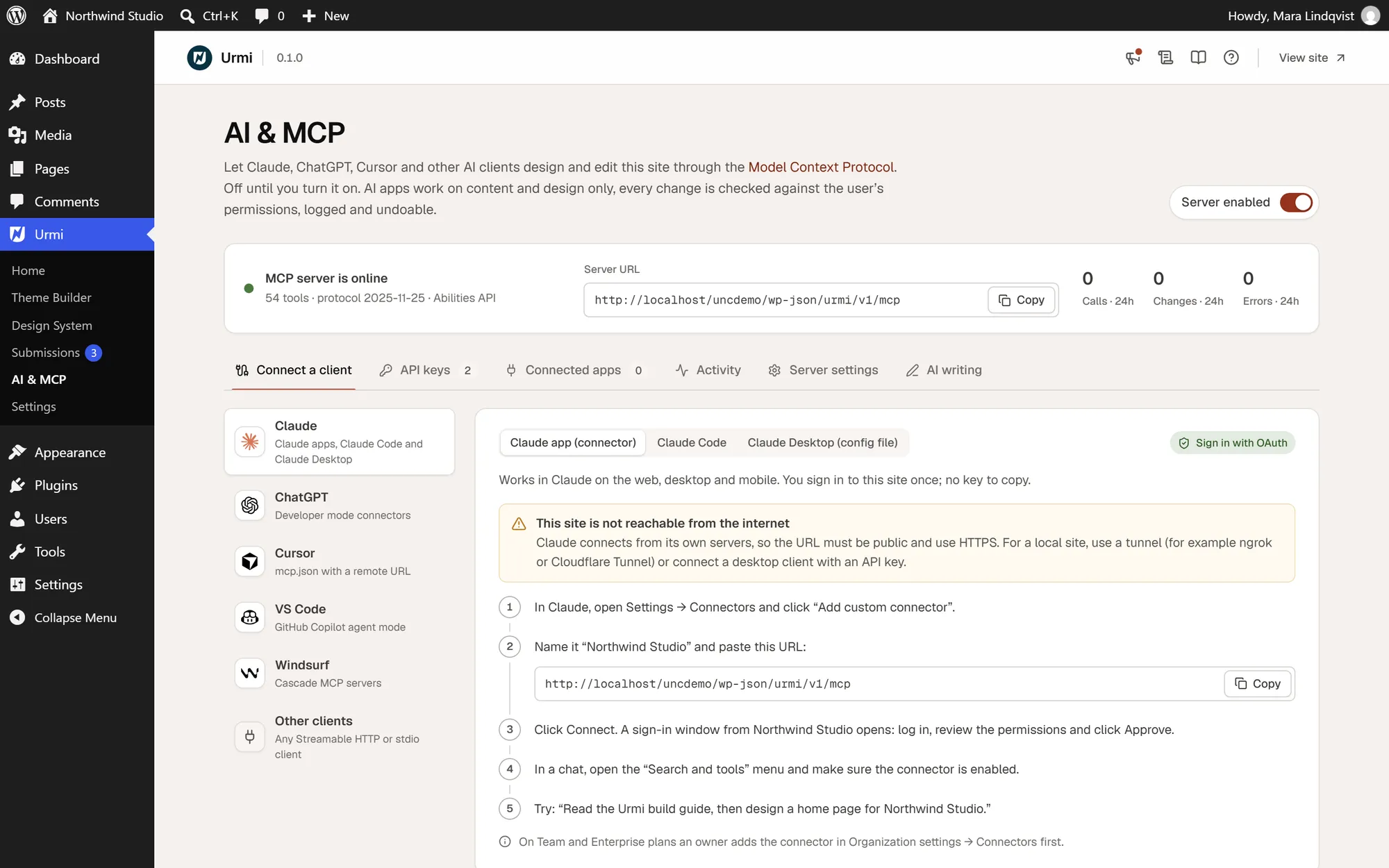

Claude
claude.ai and the Claude apps connect with OAuth as a custom connector. Claude Code and Claude Desktop can use the server URL or a configuration snippet.

ChatGPT
Add Urmi as a connector in developer mode and sign in with OAuth. ChatGPT then sees the tools your account allows.

Cursor
Add the server URL and an API key to Cursor’s mcp.json to build and edit pages from your code editor.
VS Code
Add the server to VS Code’s mcp.json and use its tools from GitHub Copilot’s agent mode.
Windsurf
Add the server and an API key to Windsurf’s mcp_config.json.
Other clients
Any client that supports remote Streamable HTTP servers works. Clients limited to local servers can use the small @wpurmi/mcp bridge.
npx -y @wpurmi/mcp --site https://example.com --key <your API key>03 What the AI can do
54 tools,
grouped by what they touch.
Each tool has a scope. A key limited to “read” can look but not change anything; “content” edits pages and posts; “design” changes templates and the Design System; “site” changes settings and menus.
| Group | Tools | What the AI can do |
|---|---|---|
| Pages | 13 | List, read, create and update pages; precise element edits; find, validate, duplicate and publish; render to proofread; audit; undo and snapshots |
| Site | 6 | Site overview and settings (read only), SEO titles and descriptions, site-wide find and replace, cache clearing, form submissions |
| Content | 7 | Blog posts and other post types, categories, tags and terms, content types |
| Guide | 6 | Build guide, widget catalogue and schemas, dynamic tags, icon and font search |
| Templates | 6 | Headers, footers, single, archive, 404 and search templates, popups, mega menus, loop items and sections, with display conditions |
| Media | 6 | Media library, image import, openly licensed image search, alt text, placeholders and simple logos |
| Menus | 5 | Create menus, replace items, assign locations, attach mega menus |
| Design | 3 | Read, update and revert the Design System |
| Patterns | 2 | Browse and use the 40 section patterns |
The tools are also registered as WordPress Abilities on WordPress 6.9 and newer, so other AI integrations on your site can use them.
04 Security
You decide
what the AI may do.
An AI connection is a user of your site with limits you set. It never gets more power than the WordPress account that approved it.
OAuth 2.1 with PKCE
Claude and ChatGPT sign in through a standard OAuth flow with PKCE, short-lived access tokens and rotating refresh tokens. No password is shared.
API keys with scopes
For other clients, create keys limited to read, content, design or site. Revoke a key or a connected app at any time.
Acts as your user
Every call runs with the capabilities of the WordPress user who connected. By default only administrators can connect.
Rate limits
Tool calls are limited per key or app (120 a minute by default, adjustable), with separate limits on sign-in endpoints.
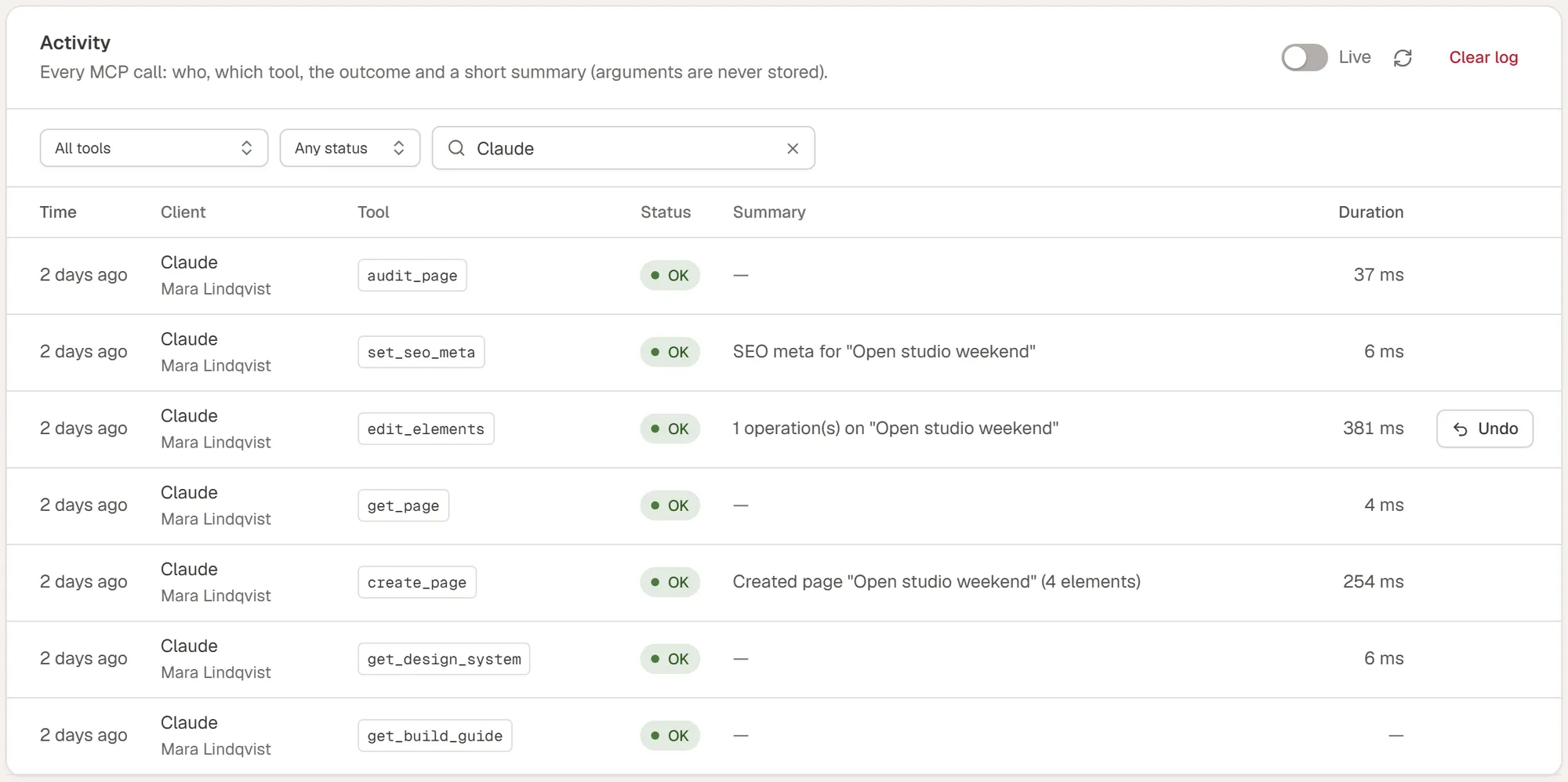
Activity log
Every call is recorded with the app, the user and a summary of the change. Arguments are never stored. Entries are kept 30 days by default.
Snapshots and undo
Before an AI changes a page, a snapshot is saved. Undo a single change from the activity log, or ask the AI to undo its last one.
The activity log: which app did what, when, and an undo button for each change.
05 AI writing & images
Optional helpers in the editor,
using the AI set up in WordPress.
Separate from MCP, the editor can rewrite text and generate images. Both are off until an administrator adds an API key, and nothing is sent unless an editor clicks.
AI writing
Rewrite any text field
Uses the AI provider set up in WordPress (Settings → Connectors, WordPress 7.0 or newer). Available on text fields in the Content tab.
AI images
Generate an image in place
Uses the AI provider set up in WordPress, when that provider can create images.
06 Example prompts
Things to try
on your first day.
“Read the build guide, then create an About page for a family bakery: a hero, our story, three values and a call to action to visit the shop. Use the Design System.”
New page
“Create a sticky header with the logo, the main menu and a “Book a table” button, and a four-column dark footer. Apply both to the whole site.”
Site parts
“Audit the Pricing page and fix every accessibility and responsive issue you find. Tell me what you changed.”
Fix
“Make the accent color a deeper green, switch headings to a serif font and round all buttons. Show me the contrast report.”
Design
“Add a slide-in popup for blog posts only that opens at 60% scroll and invites readers to the newsletter. At most once a week.”
Popup
“Rename “Summer menu” to “Autumn menu” everywhere, then write three blog post drafts about our new dishes.”
Content