
NewUrmi 0.1.0 is here — read the launch post

Features

Everything Urmi does.
One free plugin, one tour.

A visual editor, a theme builder and a design system in one plugin — plus an MCP server so your AI can use all of it. Jump to a topic below.

01 Editor

An editor that keeps up with you.
What you see is what visitors get.

The canvas renders your real theme. Panels stay out of the way until you need them, and every change is one labelled undo away.

The Layers panel, the live canvas and the settings panel. Drag handles for spacing sit right on the canvas.
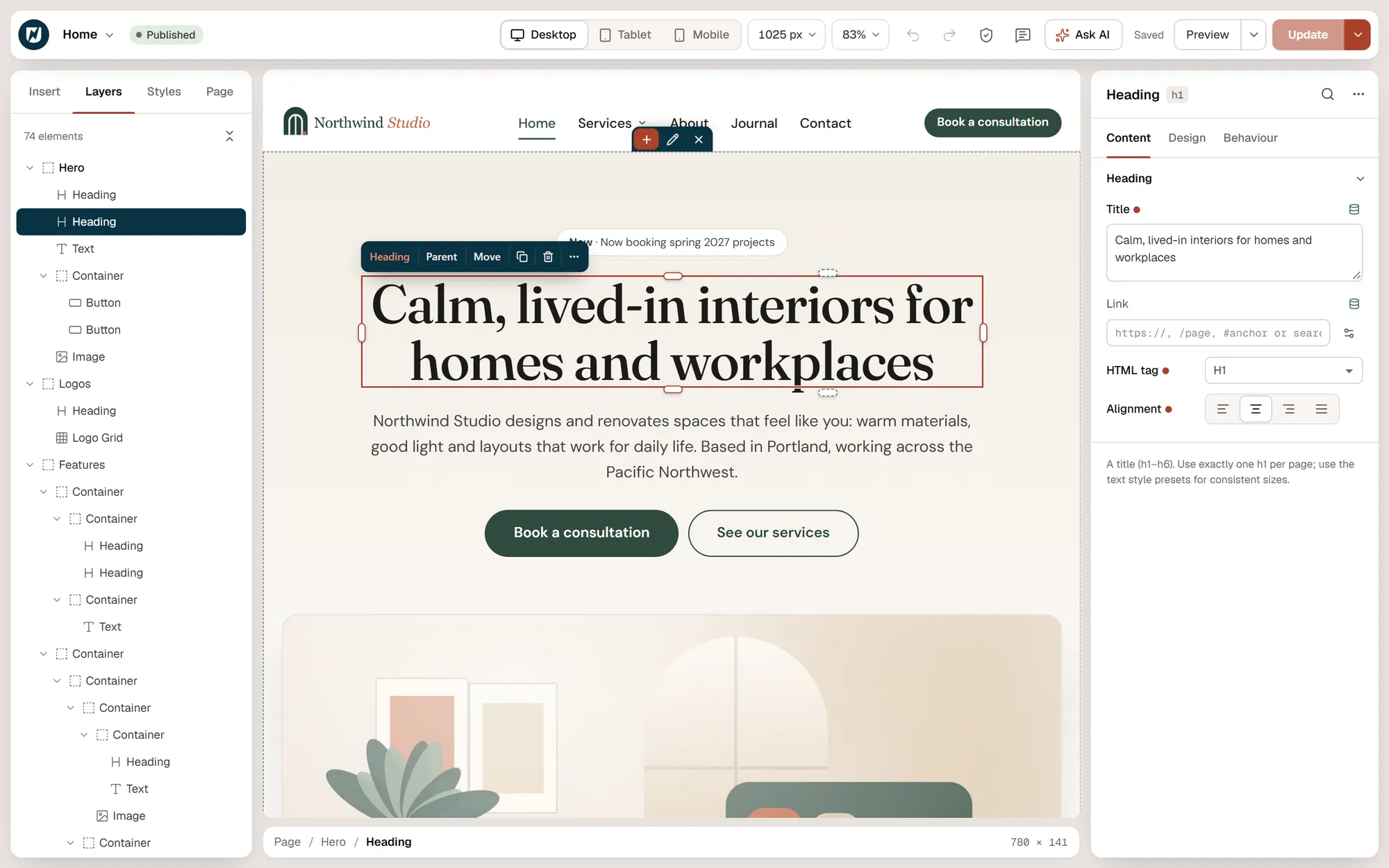
The Urmi editor: the Layers panel lists the page structure, a heading is selected on the live canvas and its settings are open on the right

Building

  • Drag widgets from the Insert panel or search them by name
  • Edit text inline on the canvas
  • Drag handles for padding, margin, gap and column width
  • Canvas width presets and zoom for every device

Staying in control

  • 200 labelled undo steps and a History panel
  • Saved versions from WordPress revisions, with preview and restore
  • Autosave every minute while you work
  • A warning when someone else is editing the same page

Moving fast

  • Command palette and keyboard shortcuts (Ctrl/Cmd + K)
  • Copy and paste between pages — or just the style
  • Pasted HTML becomes elements; dropped images upload
  • Layers panel: reorder, rename, lock and hide

Working together

  • Notes: comments pinned to elements, resolved when done
  • Find and replace for text, links and colors on the page
  • Live sync shows AI changes with an Undo button
  • Paper and Petrol night interface themes

02 Layout & styling

Real CSS layout.
Without writing CSS.

Containers are flexbox or CSS grid boxes that nest freely. Every style setting can change per device, and hover and focus states are one click away.

Layout

  • Flexbox and CSS grid containers
  • Desktop, tablet and mobile values for any setting
  • Boxed or full-width sections with automatic rhythm
  • Sticky elements, z-index and positioning

Style

  • Hover, focus and active states, plus ::before and ::after
  • Color, gradient, image and slideshow backgrounds
  • 15 shape dividers and 12 mask shapes
  • Global classes to reuse a style everywhere

Motion

  • 52 animation presets: entrance, text, stagger, scroll, hover and loop
  • Timelines with scroll, hover, click and loop triggers
  • Parallax, mouse tracking and 3D tilt
  • Everything pauses for visitors who prefer reduced motion

Behaviour

  • Interactions: 7 triggers and 11 actions, no code
  • Display conditions by login, role, date, page, URL parameter and more
  • Hide any element per device
  • Smooth anchor scrolling that respects a sticky header

03 Design System

Decide once.
Apply everywhere.

Widgets read the Design System by default, so a change to a color, a font or the button style updates every page, template and popup at once.

Colors, fonts, text styles and buttons in one place, with a style book to review them.
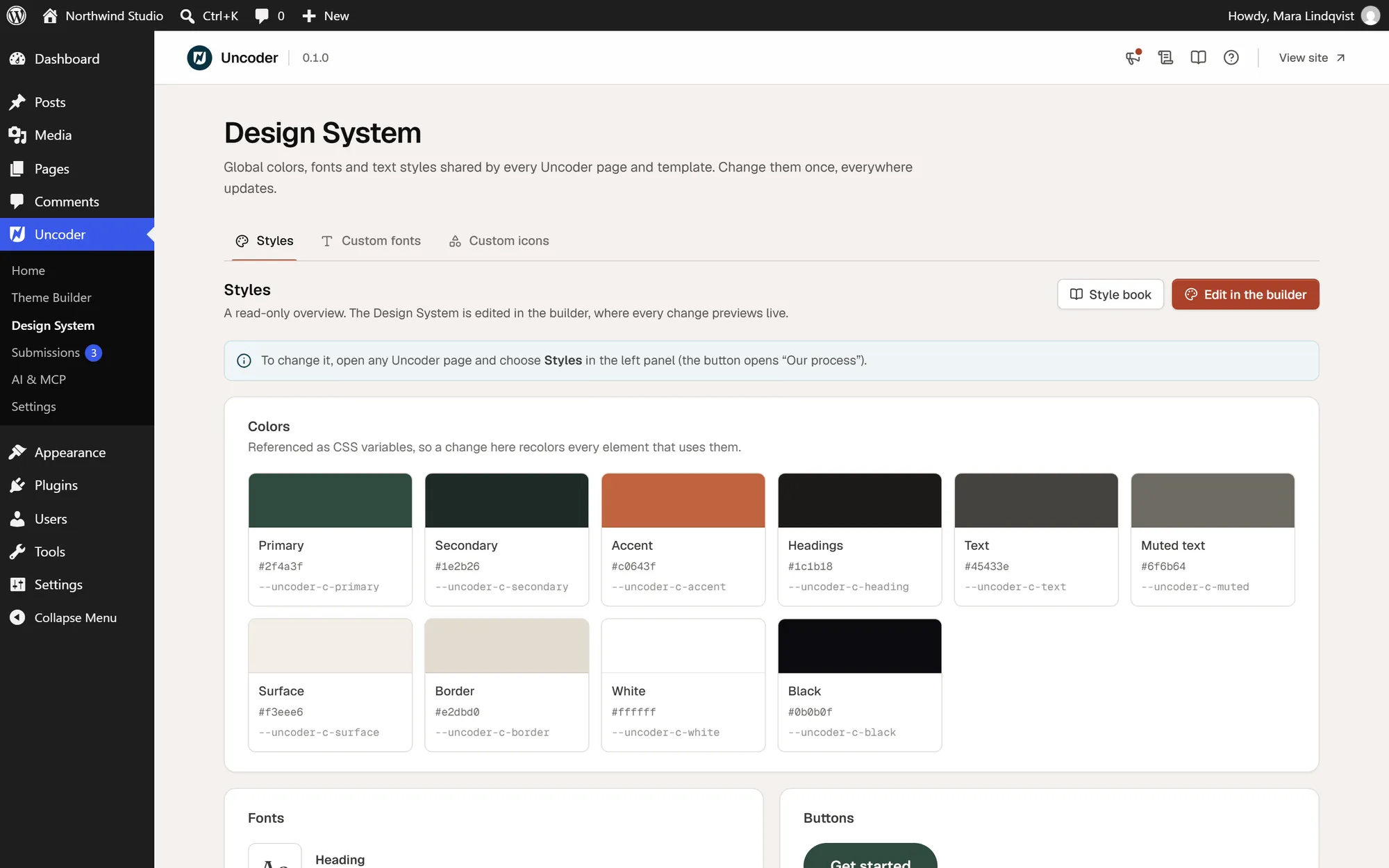
The Design System screen with brand colors, fonts, text styles and the button style

Brand

  • Global colors, each with an optional dark-mode value
  • Heading, body and extra font roles
  • Text styles from display to eyebrow, responsive
  • Default button style with 9 hover effects

System

  • Form field styles for every form
  • Container width, gutters and section spacing
  • Spacing, size and radius variables
  • Components: sections with overridable properties

Fonts & icons

  • Any Google Font, delivered from Google or self-hosted
  • Upload WOFF2, WOFF, TTF or OTF files, variable fonts too
  • Adobe Fonts web projects
  • Upload icon sets from IcoMoon, Fontello or plain SVG

04 Widgets

80 widgets,
grouped the way you think.

From a single heading to a filterable loop grid. Every widget renders on the server, and its CSS and script load only on pages that use it.

Layout

6

Container · Accordion · Carousel · Off-Canvas · Tabs · Template

Basic

21

Heading · Text · Button · Image · Icon · Icon Box · Icon List · Image Box · Divider · Spacer · Alert · Blockquote · Counter · Progress Bar · Star Rating · Testimonial · Social Icons · Text Path · Menu Anchor · HTML · Shortcode

Media

12

Image Gallery · Image Carousel · Before / After · Hotspot · Slides · Video · Video Playlist · Lottie · Logo Grid · Google Maps · SoundCloud · Facebook Embed

Marketing

11

Call to Action · Price Table · Price List · Flip Box · Countdown · Animated Headline · Marquee · Testimonial Carousel · Team Member · Share Buttons · Link in Bio

Content

9

Posts · Loop Grid · Loop Carousel · Steps · Timeline · Table · Table of Contents · Breadcrumbs · Code Highlight

Forms

2

Form · Login

Site & theme

20

Site Logo · Site Title · Site Tagline · Nav Menu · Search Form · Language Switcher · Color Scheme Switch · Reading Progress · Loop Filter · Sitemap · Post Title · Post Content · Post Excerpt · Post Info · Post Navigation · Post Comments · Featured Image · Author Box · Archive Title · Archive Description

Every widget, documented

Settings, examples and tips for each widget live in the documentation.

The count excludes the Container, the layout element every section is built from. Widgets you never use can be switched off in Settings → Elements, which also shows where each one is used.

05 Theme Builder

Every part of the theme,
designed visually.

Design the templates your theme would otherwise decide, and choose where each one appears with display conditions.

Site parts

  • Headers and footers
  • Single posts, pages and custom post types
  • Archives, search results and 404 pages

Building blocks

  • Popups and mega menus
  • Loop items for grids and carousels
  • Reusable sections and components

Control

  • Include and exclude conditions
  • Sticky, reveal, shrink and transparent headers
  • Previews that render the template in context

06 Popups

Popups that open
at the right moment.

Design the popup like any other template, then decide when it opens, how often and for whom.

Layout, size, overlay and closing options sit next to the canvas while you design the popup.
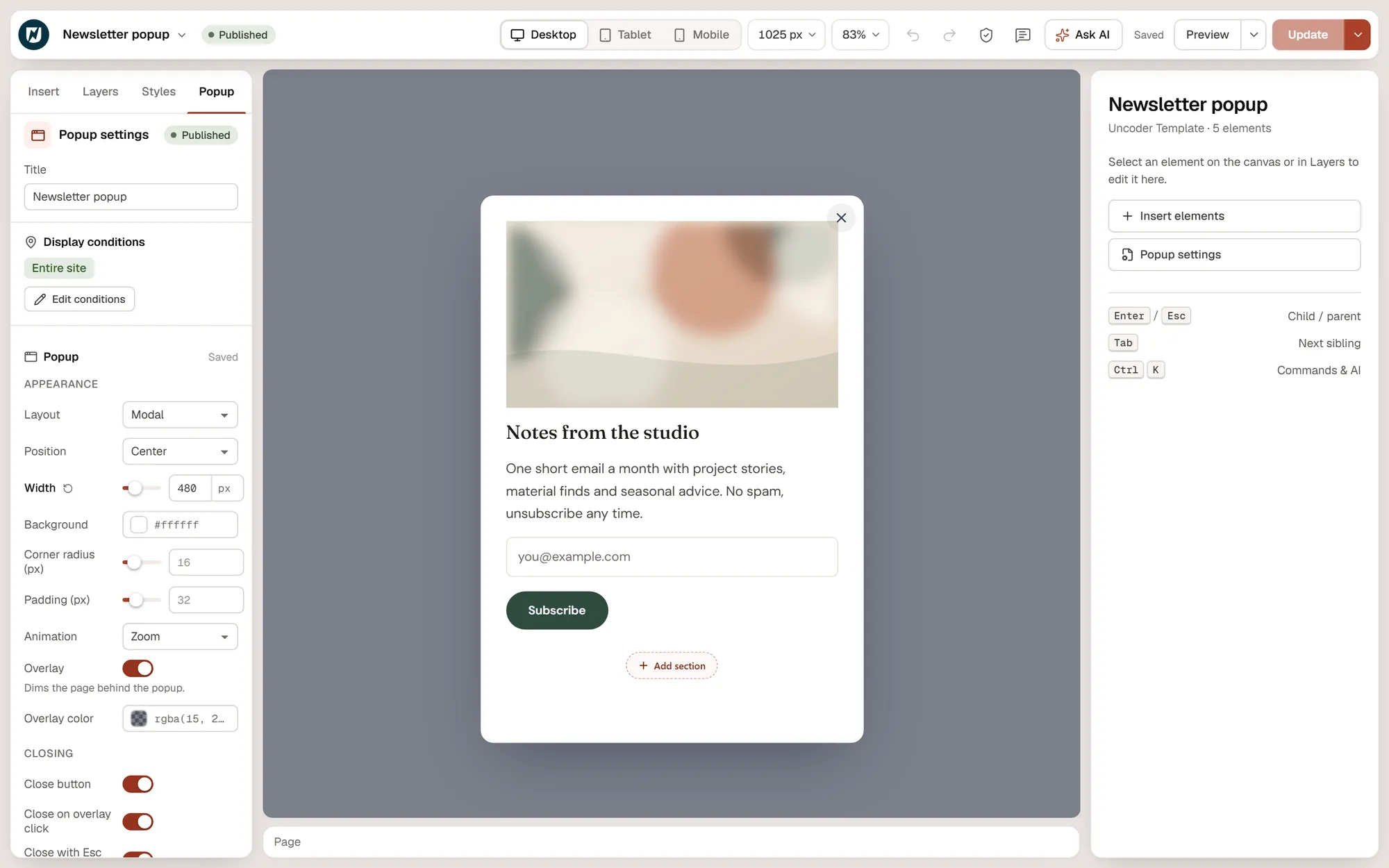
Editing a newsletter popup in Urmi, with the popup layout, width, overlay and closing options in the left panel

Layouts

  • Modal, slide-in, bar or full screen
  • Nine positions and your own width
  • Fade, zoom and slide animations
  • Close button, overlay click and Esc

Triggers

  • On page load, after a delay
  • After scrolling a percentage or to an element
  • On exit intent, click or inactivity
  • After a number of page views

Targeting

  • At most N times per session, day, week or month
  • Devices and logged-in or logged-out visitors
  • Referrer, URL parameter, visit number and schedule
  • Rules run in the browser, so they work on cached pages

07 Forms & integrations

Forms that end up
where you need them.

The Form widget validates on the server, stores every submission and sends it on — to your inbox, your mailing list or your team chat.

Fields, steps, actions after submit and spam protection, all in the form’s settings.
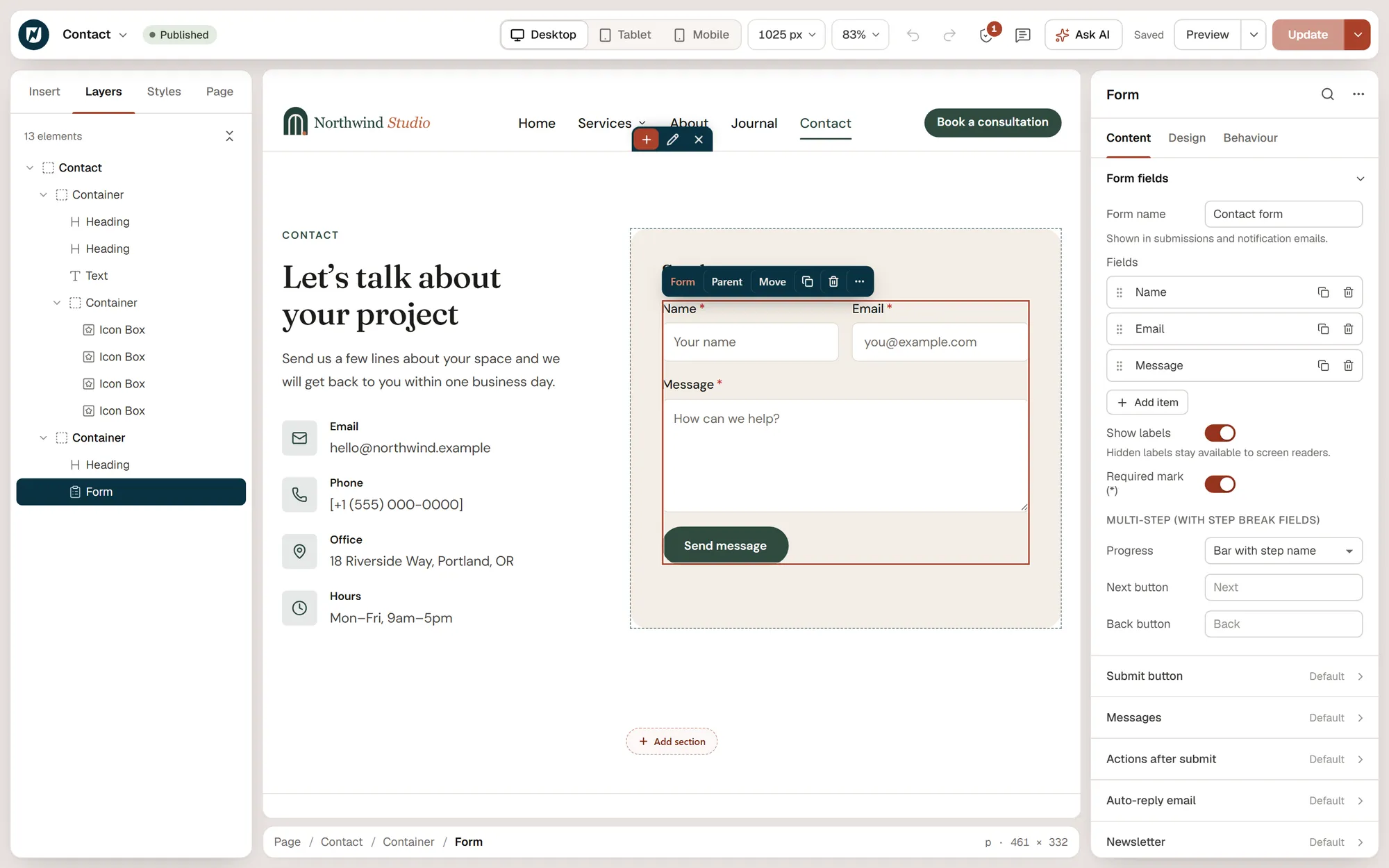
Editing a contact form in Urmi, with the form fields, submit actions and auto-reply settings in the right panel

Fields

  • Text, email, phone, URL, number, textarea and date
  • Select, radio buttons, checkboxes and consent
  • Hidden fields and file uploads
  • Multi-step forms and conditional fields

After submit

  • Email notification and auto-reply to the visitor
  • Mailchimp, MailerLite, Brevo and ActiveCampaign
  • Webhooks, Slack and Discord
  • Redirect to a thank-you page

Spam & data

  • Honeypot, signed timestamps and rate limits, always on
  • Cloudflare Turnstile, hCaptcha or reCAPTCHA
  • Submissions screen with search and CSV export
  • WordPress personal-data export and erase

08 Dynamic content & loops

Templates that
fill themselves in.

Bind any setting marked dynamic to your content, and repeat a card for every post, product or term.

Dynamic tags

  • 28 tags: post, archive, term, site and author data
  • Current user, current date and request parameters
  • Advanced Custom Fields and Meta Box, when active
  • “Open popup” and contact links (email, phone, WhatsApp)

Loops

  • Loop Grid with masonry, equal heights and load more
  • Loop Carousel with arrows, dots and autoplay
  • Any container can repeat per post or term
  • Custom, current, related or hand-picked queries

Filters

  • Taxonomy filters as buttons, dropdown or checkboxes
  • Search and sort
  • Filters update without reloading the page
  • Shareable URLs that also work without JavaScript

09 Multilingual

One design,
every language.

Urmi works with WPML and Polylang. A translation starts as a copy of the design and is then edited on its own.

Pages and templates

  • Translate pages with your multilingual plugin’s own tools
  • Headers, footers, sections, loop items, mega menus and popups follow the visitor’s language
  • “Translate into …” action in the Theme Builder

On the page

  • Language Switcher widget as links or a dropdown, with optional flags
  • A language rule in element display conditions
  • Site kit imports restore languages

10 Performance

Light pages
by default.

Urmi renders HTML on the server and sends only the CSS and scripts a page actually uses.

~2 KB

Front-end runtime. Widget code loads only where it is used.

0

Icon fonts loaded. Every icon is inline SVG.

1

CSS file per page, regenerated in one click.

Output

  • Server-rendered HTML with a CSS file per page
  • Widget CSS and scripts only where used
  • A front-end runtime of about 2 KB
  • Icons as inline SVG, no icon fonts

Loading

  • Hero image loads first with a preload hint
  • Background images below the fold load on scroll
  • Images lazy-load and decode asynchronously
  • Video and social embeds wait for a click

Fonts & caching

  • Google Fonts CDN, self-hosted, or no web fonts
  • Small stylesheets can be inlined
  • Regenerate CSS in one click
  • Cache purge for common caching plugins through MCP

11 Accessibility

Accessible output,
and checks that catch the rest.

Widgets ship with keyboard support and proper semantics, and two checkers — one in the editor, one for AI clients — point at what needs fixing.

Built in

  • Tabs follow the WAI-ARIA pattern with arrow keys
  • Accordions use native details and summary
  • Menus, carousels and popups manage focus
  • Headers and footers render as landmarks

Checked

  • Missing alt text, link names and form labels
  • Heading order and a single h1
  • Text contrast against WCAG AA, from computed colors
  • Duplicate ids, positive tabindex, autoplay with sound

Respected

  • Reduced-motion preferences across animations and effects
  • Autocomplete tokens on form fields
  • Visible labels, or labels for screen readers only
  • The same audit is available to AI clients as audit_page

12 Import & export

Move sites, start faster,
bring your past work.

Take a whole site from one install to another, start from a ready-made site, or convert what you built in Elementor.

Site kits

  • One zip with the Design System, templates, pages, menus, media and fonts
  • Settings travel without passwords or API keys
  • Preview conflicts: keep mine, replace mine or keep both
  • Links and ids are pointed at the new site

Starting points

  • Seven starter sites, from agency to SaaS
  • Each with a Design System, header, footer and pages
  • 40 section patterns in the Insert panel
  • Export and import single templates or the design as JSON

From Elementor

  • Scans Elementor pages, posts and templates
  • Converts containers, sections and about 70 widget types
  • Maps global colors, fonts and buttons to the Design System
  • Creates copies or replaces in place; Elementor data is never changed

13 Support tools

The unglamorous tools
that save an afternoon.

Everything you need to keep a site healthy lives under Urmi → Settings.

Tools

  • Regenerate CSS
  • Site-wide find and replace with a preview
  • Version rollback and system info

Site

  • Coming soon and maintenance modes
  • Roles: full access, content only or no access
  • Cookie consent with Google Consent Mode v2

Housekeeping

  • Turn off widgets you do not use, with usage counts
  • Business details as structured data
  • SEO title and description for every page
  • Remove all data on uninstall, if you choose

See it on your own site.